An AI assistant that answers your phone and your WhatsApp
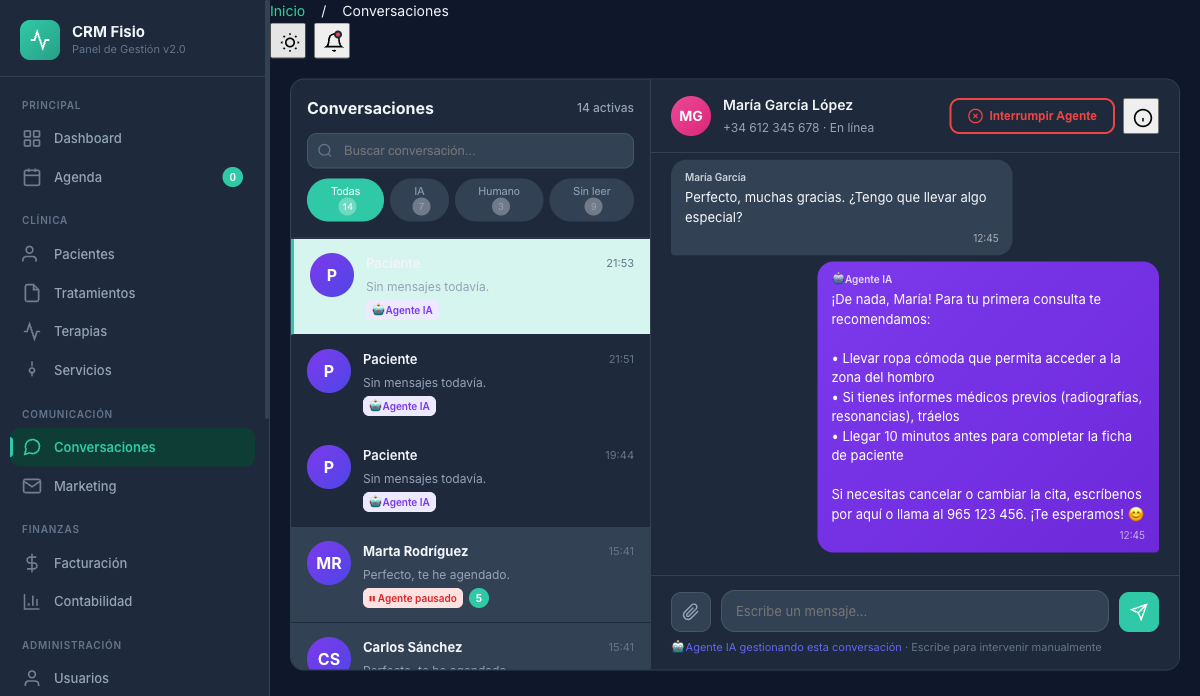
It checks your real schedule, books and changes appointments and answers questions using your clinic's own information. You configure it from the panel, without writing a line of code.
- Books, changes and cancels appointments on your real schedule
- Voice on the phone and text on WhatsApp
- Hands off to your team what it shouldn't handle
What gets complicated on the phone today
Missed calls mid-session
With your hands on a patient, you can't pick up the phone. Whoever calls and gets no answer usually tries another clinic.
The same questions over and over
Hours, prices, how to get there, what to bring to the first session. Reception repeats the same answers instead of attending to whoever's right in front of them.
No one answers outside business hours
Many patients call or write at night or on weekends, exactly when the clinic is closed.
What the agents actually do
Tools connected to your schedule and your records, not canned answers. You choose which ones each agent uses.
Voice agent on your number
Answers calls with a natural voice, introduces itself as an AI assistant and recognizes the patient by the number they're calling from.
WhatsApp agent
Replies in the patient's language, tells them when their next appointments are, and sends the clinic's location as a map pin.
Appointments on your real schedule
Finds slots by day, time or physiotherapist and creates, confirms, changes or cancels appointments. With no slot available, it adds the patient to the waiting list.
Answers with your own information
Services with price and duration, hours, policies or payment methods: it pulls it from your catalog and the documents and FAQs you upload.
Hands off what isn't its job
Emergencies, clinical questions or complaints go to your team: on WhatsApp it alerts reception; on the phone it transfers the call if you set a forwarding number.
Logs the session by voice
Captures pain before and after, techniques, observations and the plan, and saves it as a report pending validation by the physiotherapist.
How it works day to day
-
You tell it about your clinic
Upload documents and FAQs, choose the tone, formal or informal address, and emojis. Services and prices come from your catalog.
-
You choose what it can do
Turn each tool on or off per agent and talk to it in the simulator before it speaks to real patients.
-
You review what it's done
Every call is logged with duration, summary, sentiment and transcript. Every WhatsApp message, in the conversation inbox.
You configure it yourself, no programming needed
Agent name, language, voice, speaking speed, sensitivity to interruptions, call recording and transcription: it's all set from the Fisionexa panel. Personality and the knowledge base are shared across all agents.
- Voices in Spanish from Spain and Latin America
- A simulator to talk to the agent before activating it
- A knowledge base with TXT, PDF or Word documents and FAQs
- Call recording and transcription you can turn on or off
What people usually ask
Does the patient know they're talking to a machine?
Yes. The agent introduces itself as an artificial intelligence assistant at the start of the call or chat, warns if the call is being recorded, and never claims to be a person.
Do the appointments the agent books go to my schedule?
Yes. It only offers the open slots it finds on your schedule and creates the appointment in the same calendar your team uses, with the chosen physiotherapist or whoever is free.
What does it do with an emergency or a clinical question?
It doesn't handle it itself. On WhatsApp it pauses the chat and alerts reception with a summary. On the phone it transfers the call to your forwarding number or takes down the reason so the clinic can call back. For acute pain, it recommends going to urgent care.
Does what it records by voice go straight into the clinical history?
No. The session report the agent captures stays pending validation and doesn't count toward the treatment's progress until the physiotherapist reviews and validates it.
Keep exploring the system
Every module shares data with the rest: what happens in one reaches the others without copying anything.
See it working with your clinic
Request a free 20-minute demo or jump straight into the interactive demo: the website and dashboard of a sample clinic.